Multi-service integration
Connect e-commerce, delivery, social networks, content sources and Airtable without manually copying the same information between systems.
Visual workflows connecting e-commerce, social publishing, external content sources and Airtable-based operational databases.
The scenarios combine visual orchestration with data mapping, conditional paths, external services and record updates after each process completes.
Connect e-commerce, delivery, social networks, content sources and Airtable without manually copying the same information between systems.
Divide processes into different routes, set variables, parse source content and map the fields expected by the next module.
Search existing records before creating new ones and update source records after publishing or processing has finished.
These cards represent workflows already created in Make. Each detailed section below explains the process, services and evidence without inventing performance metrics.
Connects Filipa's online-store order flow to an InPost delivery process, reducing repeated manual shipment preparation.
Reads approved records from Airtable, publishes to X through Buffer and creates image posts for Facebook and Instagram before updating the corresponding Airtable records.
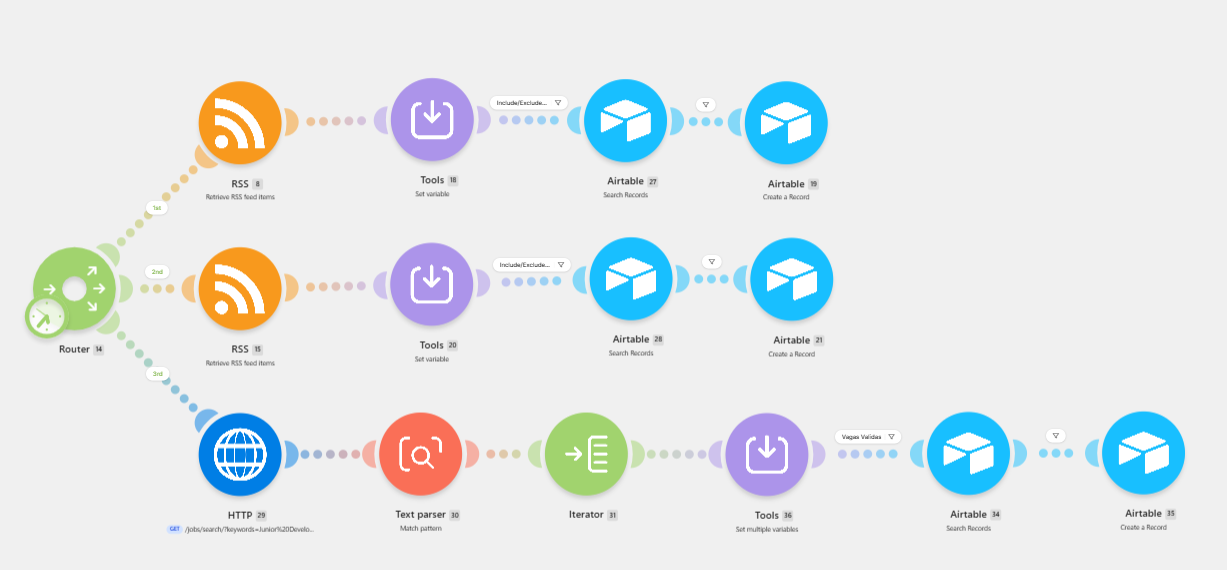
Collects records from RSS and HTTP sources, parses and iterates the results, checks Airtable for existing entries and creates new CRM-style records when required.
A delivery automation joining the store's order process to InPost. The exact Make modules and field mappings will be documented from the exported scenario before the Blueprint is published.
Reduce repeated manual preparation of shipment information.
Scenario screenshot, one redacted execution and the sanitized exported Blueprint.
Save the screenshot as:
assets/automations/make-inpost-workflow.png
A router divides the scenario across multiple sources. RSS routes process feed items, while an HTTP route parses and iterates external content before checking and creating Airtable records.
Retrieve feed items, set the required variable, search Airtable and create a new record when needed.
Apply the same controlled record-processing pattern to another feed.
Retrieve external content, match the required pattern, iterate results, set variables and check Airtable before creating CRM entries.
Load a published sanitized Blueprint or inspect a local export directly in the browser. Local files are never uploaded by this page.
The public library will work after the exported Blueprint files are added to the folder listed below.
Select a workflow or choose a local Blueprint file.
blueprints/make-inpost-delivery-blueprint.json
blueprints/make-social-publishing-blueprint.json
blueprints/make-feed-crm-blueprint.json
{
    "status": "No Make Blueprint loaded"
}
A valid Make Blueprint should come from an exported scenario. After export, review the JSON, remove private business values and publish the sanitized file. The connections still need to be configured by whoever imports it.
Screenshots and Blueprints must be redacted before publication. No credentials, customer records or private connection identifiers should appear.
A readable image showing the real module sequence and routes.
One redacted run showing that the scenario reached the expected result.
The exported workflow JSON after private values have been reviewed and removed.
Multi-Channel Social Publishing
Airtable acts as the content source and process record. Buffer publishes the status update to X, while the Meta modules publish image posts to Facebook Pages and Instagram for Business.
Module sequence